CNAs (Certified Nursing Assistants) need software that is quick, reliable, and simple to use during demanding shifts. Their daily routines are busy, and documentation must happen without slowing down patient care.
The most useful CNA software solutions combine point-of-care charting, automated reminders, ready-to-use templates, and real-time data sharing. These tools help staff record vitals and care notes efficiently while maintaining accuracy.
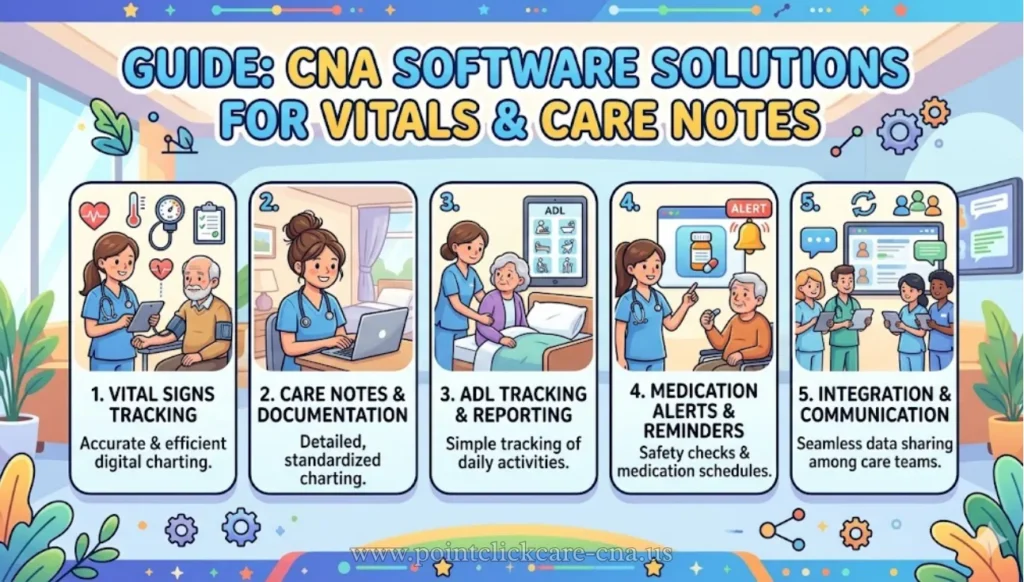
Modern digital systems are designed to replace traditional paper records. Instead of writing notes on paper and transferring them later, CNAs can record information directly into a device.
This makes documentation faster, reduces errors, and ensures patient information stays updated. In healthcare environments where time is limited, having software that supports smooth documentation can make a significant difference in both workflow and patient safety.
Introduction
CNA shifts are often very busy and physically demanding. Staff members move between rooms, respond to call lights, assist patients with mobility, and answer questions from families. During all of this, they must also record vital signs and write care notes accurately. These tasks create two major challenges: limited time and heavy documentation requirements.
Without efficient tools, CNAs may delay charting until later in the shift. This delay can lead to forgotten details or incomplete records. Digital CNA software helps solve this problem by allowing documentation at the bedside. Instead of relying on memory, staff can enter information immediately after completing a task.
Replacing paper charting with digital systems also improves communication among healthcare teams. Nurses and supervisors can view updates instantly, which helps them respond quickly to patient needs. Overall, digital tools help CNAs focus more on patient care rather than paperwork.
Why Efficient Tracking Matters
Recording vitals and care notes accurately is essential for maintaining patient safety. Vital signs such as temperature, blood pressure, and pulse provide important information about a patient’s health. When these details are recorded correctly and updated regularly, healthcare providers can detect health changes early and take action before problems worsen.
Efficient tracking also supports smoother workflows. When documentation happens at the point of care, staff avoid repeating the same work later. Standardized dashboards and organized records allow caregivers to find patient information quickly. This becomes especially important during shift changes when outgoing staff must share updates with incoming team members.
Compliance is another key reason efficient tracking matters. Healthcare facilities must follow strict documentation standards to meet legal and regulatory requirements. Notes must be clear, accurate, and completed on time. Digital systems help ensure that records meet these standards by guiding users through required steps and preventing incomplete entries.
Common CNA Challenges
Recording vitals during busy shifts
CNAs often move quickly from one patient to another, leaving little time for documentation. When vitals are written on paper first and entered later, mistakes can happen. Numbers may be recorded incorrectly, or some values may be forgotten. Real-time digital entry reduces these risks by allowing immediate documentation.
Missing entries due to workload
Heavy workloads and staffing shortages make it easy to delay charting. By the end of the shift, details can become unclear, leading to incomplete notes. Software that sends reminders or prompts users to record information at specific times helps prevent missed entries and improves overall accuracy.
Switching between systems
In some facilities, vitals, care notes, and patient records are stored in separate systems. This forces CNAs to switch between screens, which wastes time and increases frustration. Integrated platforms combine multiple functions into one system, making it easier to access all patient data in one place.
Writing detailed care notes
Care notes must be clear and descriptive, but writing detailed notes can be time-consuming. Free-text writing takes longer, especially during busy periods. Structured templates help staff record information quickly while ensuring notes remain consistent and easy to read.
Features To Look For
Fast vitals entry tools
Quick-entry tools allow CNAs to record vital signs such as temperature, pulse, respiration rate, blood pressure, weight, and oxygen saturation with minimal steps. These features reduce typing time and help staff finish documentation faster before moving to the next task.
Pre-built care note templates
Templates simplify the process of recording routine care activities. These may include hygiene assistance, mobility support, fluid intake, safety checks, and patient observations. Using templates ensures that notes follow a consistent format, making them easier for nurses and supervisors to review.
Mobile-friendly dashboards
CNA software should work smoothly on smartphones or tablets. Mobile-friendly dashboards allow caregivers to document information directly at the bedside. This reduces the need to return to a workstation and supports real-time updates during rounds.
Offline documentation support
Reliable offline functionality is important in areas where internet connections may be weak. Offline mode allows CNAs to record vitals and notes without interruption. Once the device reconnects to the network, the information syncs automatically, ensuring no data is lost.
Smart alerts and reminders
Automated reminders help staff stay on schedule by alerting them when tasks are due. For example, alerts may notify CNAs when vitals are overdue or when follow-up checks are required. These reminders reduce missed tasks and support better patient monitoring.
Integration with care systems
The most effective CNA software connects with other healthcare systems such as electronic health records and medication tracking tools. Integration allows information to flow smoothly between systems, reducing duplicate data entry and improving communication among healthcare teams.
Also visit: Efficient Daily Documentation in Long-Term Care Software
Best Software Solutions
| Software | Best Use | Main Advantages | Possible Drawbacks | Pricing Idea | Time-Saving Features |
| PointClickCare | Large nursing homes and long-term care facilities | Strong bedside charting, accurate vitals recording, real-time dashboards, connects with other care systems | May feel complicated for small teams; requires training | Custom enterprise quotes | Quick mobile charting, automatic vitals logging, integrated medication records reduce paperwork time |
| Epic | Hospitals and large healthcare organisations | Very detailed patient histories, structured templates, strong data sharing between departments | Often more complex than needed for small CNA teams | Enterprise-level custom pricing | Reusable templates and automated reports reduce repetitive documentation |
| Birdie | Home care and domiciliary care providers | Real-time care notes, mobile-friendly app, works even without internet | Mainly designed for home care rather than facility settings | From around £179.99/month | Offline note-taking and automatic syncing prevent duplicate recording |
| Log my Care | Small to medium care homes moving from paper records | Easy to learn, affordable, mobile access, simple daily workflow | Fewer advanced tools than large enterprise systems | Subscription-based, lower-cost plans | Digital handovers and task logs save time during shift changes |
| CareLineLive | Community and home care agencies | Scheduling, live visit tracking, medication recording, family communication tools | Less suitable for inpatient facility workflows | Tiered or quote-based pricing | Automatic visit logging and alerts reduce manual recording |
| CareGovern | UK supported living and compliance-focused care settings | Inspection-ready notes, audit trails, incident recording, compliance support | Not designed for every clinical or hospital setting | From £179.99–£299.99/month | Built-in compliance templates reduce time preparing inspection evidence |
How It Saves Time
A well-organized workflow helps caregivers save valuable time during busy shifts. It usually begins with recording vital signs at the bedside, followed by using a simple note template and then sharing the information instantly with the nurse or supervisor. This step-by-step process keeps records updated in real time and reduces the stress of completing paperwork at the end of the shift.
For example, during a morning round, a CNA can quickly enter vital signs such as blood pressure, pulse, and temperature using a mobile device. Instead of writing long notes, they can select a ready-made template like “routine check,” add short observations about the patient’s mobility, mood, or appetite, and save the update immediately.
This ensures that the next caregiver can view the latest information without waiting for paper files or manual data entry. Overall, digital workflows make documentation faster, more accurate, and easier to manage during daily care activities.
How To Choose
Selecting the right documentation software depends on several key factors. The first thing to consider is the size of the facility. Large hospitals or skilled nursing facilities often need systems with advanced reporting features and strong integration with other healthcare tools.
On the other hand, smaller care homes or home-care teams usually benefit more from simple, mobile-friendly platforms that are easy to use on the go.
Training requirements are another important factor. If staff members change frequently or new CNAs join regularly, the software should have a simple design, clear instructions, and easy-to-follow templates. This helps new users learn quickly and prevents delays in daily work.
Budget is also an important consideration. Smaller organizations often start with affordable solutions that provide essential features without extra costs.
Larger facilities may invest in more advanced systems because they support compliance, reduce errors, and improve efficiency over time. Choosing software that balances features, usability, and cost ensures long-term success.
Mistakes To Avoid
One common mistake is choosing software that is too complicated. Even if a system has many features, it may not be helpful if CNAs find it difficult to use during busy shifts. Simplicity and speed are more valuable than unnecessary complexity.
Another mistake is ignoring mobile compatibility. Since most CNA tasks happen away from desks, software must work smoothly on mobile devices. Poor mobile performance can lead to delays, missing entries, and frustration among staff.
Skipping proper training is also risky. Even the best software may fail if users do not understand how to use it correctly. Systems that include tutorials, templates, and onboarding support make adoption much easier and more successful.
Real Workflow
A typical CNA morning routine includes checking vital signs, entering them into a digital form, adding short notes about the patient’s condition, and sending alerts if anything unusual appears. When all these steps happen in one system, the process becomes faster and more reliable than using paper records or multiple tools.
This approach improves teamwork because nurses and supervisors can review updates immediately. It also reduces the chance of forgetting important details later in the day when tasks become more demanding. By keeping records updated in real time, caregivers can focus more on patient care and less on paperwork.
FAQ
Can CNA software work offline?
Yes. Some CNA software, including Birdie, allows offline recording so caregivers can enter data without internet and automatically sync information once the connection is restored later.
What is the most commonly used EMR software?
Epic is one of the most widely recognized EMR or EHR systems, especially in large hospitals and healthcare organizations that manage high volumes of patient records.
Do CNAs use EHR?
Yes. CNAs commonly use EHR or care management systems to document patient care, update daily notes, and share important information with nurses and other healthcare team members.
What software is used for digital documentation?
Common digital documentation tools include PointClickCare, Epic, Birdie, Log my Care, and CareLineLive, which help healthcare workers record, store, and access patient information efficiently.
Which technique is efficient for tracking patient data?
Point-of-care structured digital entry is efficient because it allows caregivers to record information immediately, reducing delays, minimizing transcription errors, and improving overall documentation accuracy.
How long does documentation take?
Documentation time varies depending on the system used, but digital templates and mobile charting tools usually reduce the time required compared to traditional handwritten paper notes.
Is CNA software difficult to learn?
Some CNA software is easy to learn with simple interfaces, but larger enterprise EHR systems often require more detailed training sessions and practice before users become fully comfortable.
Final Recommendation
For most CNA teams, the strongest software options include PointClickCare, Birdie, and Log my Care because each fits different care environments.
PointClickCare works especially well for larger facilities that need strong coordination and detailed clinical features.
Birdie is ideal for home-care teams who rely on mobile devices and need quick, simple access while on the move. Log my Care suits smaller teams that want an easy system without complex setup.
If your organisation requires advanced clinical connections, PointClickCare or Epic may be suitable. For faster learning, smooth daily use, and efficient documentation, Birdie or Log my Care are practical choices that help staff record vital signs, notes, and alerts quickly while improving safety.